
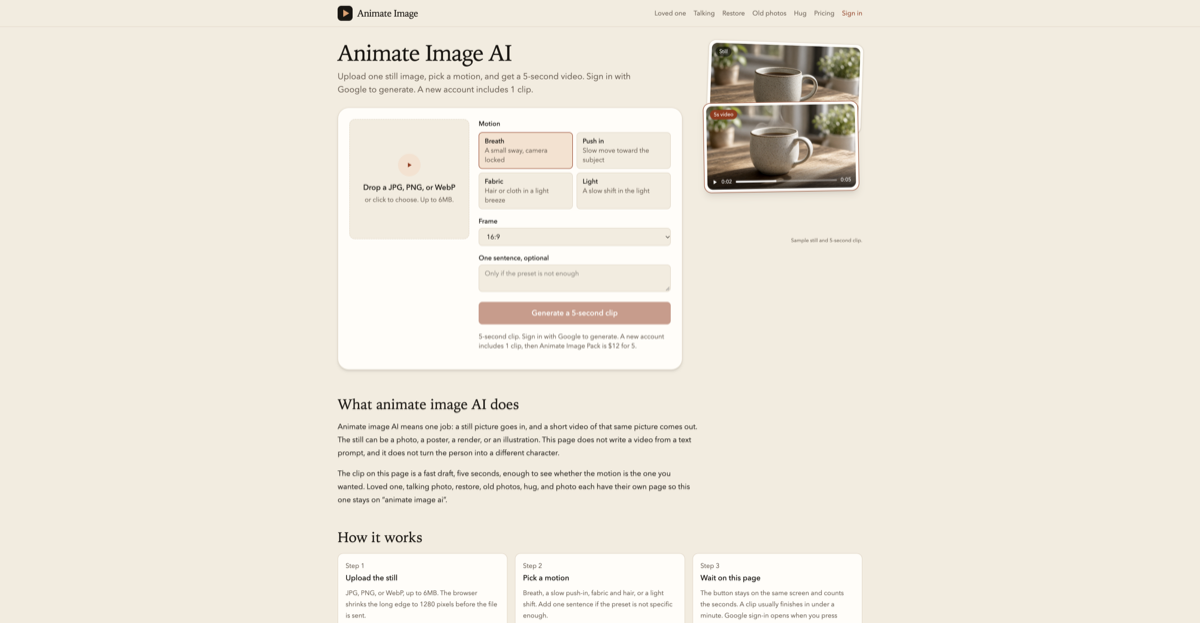


What website is this?
AnimateImage.io is a browser tool that turns an existing still—photo, poster, or render—into a clip of about five seconds. It does not write a video from a text prompt, and it does not replace the person with a new character. After upload you pick breath, a slow push-in, fabric or hair sway, or a light shift, and the presets try to keep the face, objects, and background in the original frame. It fits people who already have the picture and only need a little motion for a landing page or social post.
Key Features
- Upload JPG, PNG, or WebP; the browser shrinks the long edge to 1280 pixels before sending.
- Four motion presets—breath, push-in, fabric, light—plus an optional one-sentence note.
- The clip is about five seconds; the page counts down, and the site says a run often finishes in under a minute.
- You get a video file you can open and save, not a slideshow of the still.
- A new Google account includes one clip; extra clips come from a pack or a monthly plan.
Use Cases
- Ecommerce staff who need a pack shot to move a little for a listing or Story, without booking another shoot.
- Portrait photographers who want a breath or slow push on a head-and-shoulders frame, not a new face.
- Designers or 3D artists who already have a poster or still render and want a short preview before opening an editor.
- Family-archive work that needs a slight motion on an old scan belongs on the site’s old-photo pages; this page stays on general still-to-clip.
Who is it for?
- Ecommerce and social teams who already have the still and only need a short moving asset
- Photographers who want to try a few camera moves without writing a text-to-video prompt
- Print and 3D artists turning a poster or render into a short preview
- A poor fit: people who need a storyboard from scratch, lip-synced speech, or a clip longer than about five seconds (talking-photo and similar jobs have other pages on the same site)
How It Compares to Similar Tools?
Start with three checks: whether you must already have a still, how long the clip is, and how billing works.
- Text-to-video tools write a new shot from a prompt; this page does not.
- Talking-photo or face-swap tools change the performance; these presets ask the model to keep the original face and background.
- Billing: one clip on a new account, then a pack (the pricing page lists Pack as five clips) or monthly clip additions; there is no unlimited free queue.
FAQs
Q: How many free clips does AnimateImage.io include?
A: After Google sign-in, a new account includes one clip of about five seconds. Remaining clips stay on that account; prices are on the pricing page.
Q: How long is the video, and how long does generation take?
A: The clip is about five seconds. The site says a run often finishes in under a minute, and the page counts while it works.
Q: Can I describe the motion myself?
A: Yes. Pick the closest preset, then add one sentence. The preset still tells the model to keep the same face, objects, and background.
Q: Can I use the clip in an ad?
A: You need the rights to the image you upload, and you are responsible for people and trademarks in the frame. The site says a clip made from a picture you have rights to is yours to post, including in ads.